Showing posts with label Google Docs. Show all posts

Saturday, February 19, 2022

The Night Before the Snow Day

 Are you or your "kids" (students or your actual children) anticipating or wishing for a snow day? If so, this post is for you! 

My kids and I read The Night Before the Snow Day by Natasha Wing. We talked about superstitions like putting pajamas on backwards, doing snow dances, and even putting ice cubes in the toilet. 


I decided to make some activities that I could see being used by:
  • homeschoolers with kids at different levels
  • classroom teachers
  • substitutes
  • teacher candidates for reading demo lessons that showcase differentiation


These lessons can also be done:
  • during virtual learning -  independently while asynchronous or as a class or with partners
  • on paper - options for writing or cutting


Like all of my Google Doc lessons, there is a linked table of contents that makes navigation easy as well as an answer key and differentiated pages!


Thursday, October 14, 2021

Fourteen Monkeys: A Rainforest Rhyme

Do you have students who are interested in monkeys or the rainforest? Did you come across this post while looking for research resources? We came across the book Fourteen Monkeys: A Rainforest Rhyme because it had a number word in its title and my son was interested since we had just visited Rainforest Cafe, where we got a book called Night, Night Jungle. Visit Manu National Park in Peru, a rainforest about the size of New Jersey, where 14 species of monkeys live, through this book.

I wouldn't exactly consider this one a good read aloud story, or even a very good story for preschoolers, simply because it contains a lot of information...UNLESS you only read the short bolded sentence for each set of pages. 
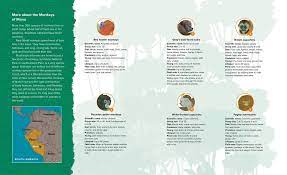
I would, however, recommend it to my fourth graders when we focus on non-fiction text features. I'm happy to have both options for my more curious readers who may want to pick up the book after I've introduced it and read the shorter version.

It's also great for organizing information and taking notes. I created a Google Doc to do this, and you can snag it for free to use for practice. Just complete together as a class, in small groups, or as individuals. It has a bookmarked table of contents for easy navigation as well as answer keys. Remember to make two copies - one for yourself with answer keys and the other to share with students.


Click the image or here to make a free copy of the Google Doc.

I strongly suggest visiting Manu National Park in Peru via Google Earth. The pictures in the book are beautiful, but it's important to actually locate its place in space. At first you'll notice a blurry green screen. Ask your student(s) why! It's the rainforest canopy!


For a challenge, students can create their own games or worksheets, such as:
  • true/false statements
  • Bingo boards
  • board games
  • word searches
  • crossword puzzles
  • Venn diagrams
Want to incorporate math? (included in the Google Docs)
  • Graph number of babies
  • Graph lifespan

Get artsy! Make these 3D monkeys and create your own rainforest diorama!

Want to learn about another biome? Check out this post about the  Blue Ridge Mountains

Interested in more science projects and posts? Look no further.

Searching for more number books or counting books?


Sunday, August 30, 2020

Remote Learning Organizer

Are you looking for a way to help keep yourself and your students or kids organized while learning online? I have created this hyperlinked Google Doc that allows you to input assignments across multiple sites / platforms, or even just paper work. You can embed links into the organizer that will take students straight to their assignments - on Google Drive or Classroom, PDFs, websites, videos, songs, etc. Students click on the table of contents to view their work for that day. 

Click here to download this 6 page Google Doc on Teachers Pay Teachers.

Check out my other products here.


Monday, May 18, 2020

Hands-on Reading Projects

Looking for some hands-on reading projects for intermediate, middle, and high school grades? These engaging ideas include templates, examples, and explanations for students to show what they know. They can all be done on paper or digitally!


Projects include:

-Diorama

-Triorama

-Character Interview

-Scrapbook page

-Movie poster

-Newspaper

-Yearbook page

-Timeline / Plot diagram

-Diary entry

-Travel map

-Song Scenes

-Foldable book

-Pop-up book

-Cell phone dialogue

-Play

-Comic


Students can be given the ability to choose between 16 projects or all students can complete the same project with different books. This Google Slide presentation includes links to Google Docs templates that students can use to complete projects as well as links to other websites where projects can be completed digitally. Rubrics are also included for some projects.

Download these projects here.

#projectbasedlearning #PBL #remotelearning #distancelearning


Looking for other digital projects and lessons? Check these out: 

-Bitmoji Bookmark Projects

-Digital Memory Book

-Digital Escape Rooms

-Concrete Poems

-Meet an Author Opinion Writing

-Digital Escape Rooms

-ABC Research Book

-Country Research Report


Tuesday, May 12, 2020

Digital Memory Book


Looking for a fun way to end the school year? This 18 page Google Docs digital memory book is such a fun and engaging writing activity. Students will love it. Create a digital Google Docs memory book for your younger students or with your child or have students create their own! This resource includes 18 pages of activities, including a place for students to publish their best story and poem, to record favorites and interests, awards for themselves and classmates, and to record events. Perfect for remote, virtual, or distance learning.

Easily editable! Currently set for 2019-2020 school year in fourth grade, but can be changed in minutes.


Bitmoji Bookmark Project


Looking for a fun way to motivate students to read or summarize what they've read? This project is so fun! The purpose of this project is to encourage kids to check out books that they may not have considered in the past. They will also get to know the names and faces of the classmates in the classroom or building. This is a great project for virtual or remote learning and to motivate students to read during the summer or all year round.
This resource features step by step directions to create a Bitmoji, 3 examples, and 25 sets of 3 bookmarks for your students to create digitally.  Download it here!

Projects like these work best when students are preassigned page numbers. For third graders and for teachers working remotely, I suggest having the teacher type student names underneath the "Recommended by" so there aren't arguments over who is typing on each slide. One requirement I had was that students could not repeat books, so it was motivating to complete bookmarks before anyone else could "steal" their ideas.

Want to get staff members involved? Download my Staff Bitmoji Bookmark Project. These are great to laminate and have on hand in a school library.

Need a video to learn how to create a Bitmoji?


Download the Bitmoji app here.

Already have a Bitmoji and looking for learning / teaching ideas?


Friday, April 3, 2020

New Jersey and Federal Legislature

Is your class learning about the New Jersey or federal legislative branches? Check out these free Google Docs! The legislators are accurate for NJ as of April 2020.

Click here to download. Just click "File" ---> "Make a Copy" and then edit the document as needed. 

If you're doing remote learning like my class, consider removing the answer key before sharing! I have given differentiated options in the directions for you to print and have students write the answers in the chart, print and have the kids cut and paste their answers into the chart, or for students to copy and paste the words from the word box into the chart.


Click here to download. Just click "File" ---> "Make a Copy" 

Click here to download. Just click "File" ---> "Make a Copy" 


Here is a fun video field trip to the NJ State House. It's very similar to the tour given on field trips.

Monday, February 18, 2019

Black History Month: Compare and Contrast MLK and Nelson Mandela

In honor of Black History Month and reading My Brother Martin and Me by Christine King Farris (Martin's sister) in our fourth grade Journeys book, we decided to compare and contrast Dr. Martin Luther King, Jr. and Nelson Mandela. 

My class is a 1:1 Chromebook class, so we did this assignment together as a class on Google Docs. 
If you purchase this item on TPT, you can easily copy and paste from the PDF into Google Docs.
If you haven't used Google Docs as a class, I suggest going over a procedure for erasure. If someone accidentally deletes the graphic organizer, we all stop immediately and take hands off the keyboards until the mistake can be fixed by the person who deleted or until the previous version can be restored.

The great thing about this lesson is that I have adapted it for you so that it can be used in whole or in parts, independently or in small or whole groups. This would even be great if you homeschool! Rubrics are included for different expectations. You also don't have to search for resources to make sure they are appropriate since I've included links for you!

See more pages and download this resource in my TPT store.

We also watched his I Have a Dream speech 


and made this beautiful dove bulletin board. 

Students wrote ways they will and already do use peaceful, powerful words.


Who else would you like to see included in another compare and contrast project?